
Edit online
Make it in your browser, free
Type your text, download the video. No app needed.
On this page · 7 sections
A karaoke lyric video shows the words of a song on screen and fills them with color as they are sung. The easiest way to make one: create the animated lyric lines as transparent clips, place them above your song in a video editor, and adjust each clip so the color reaches the end of the line when the singer does. You can make the lyric clips for free in the browser with the Karaoke Lyric Lines template. This guide covers how the template works, how to sync it to your song and which other templates finish the video.
How the karaoke template works
Be clear on one thing first: the template does not listen to your song. It is an animation, and you do the syncing in your editor. Here is what it does:
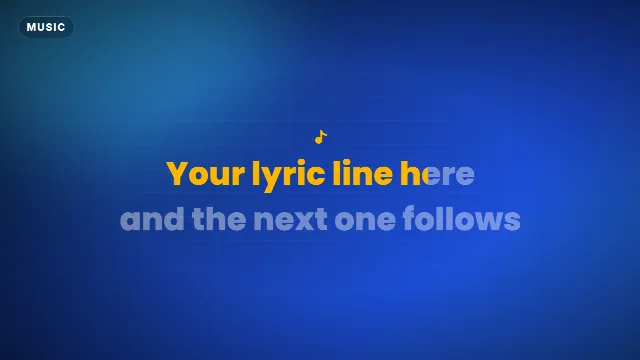
- Two lines per clip. You type a first and a second line, up to 32 characters each.
- Both lines appear at the start, with a small music note above them.
- Line one fills with your accent color from left to right, then there is a short pause, then line two fills.
- The fill is even. It moves at a steady pace over the whole line, not word by word.
- About 8 seconds per clip at the default speed. The Animation speed slider makes it shorter or longer, roughly between 5 and 11 seconds.
- No sound effects, so nothing plays over your music.
You can change the accent color (the fill), the text color (the unsung part), the font from 38 options, the speed and the size: 16:9, 9:16 or 1:1.
Step by step
1. Split the lyrics into pairs of lines
Write the lyrics out and break them into short lines, the way they are sung. Keep each line under 32 characters. Group them in pairs: lines 1 and 2, lines 3 and 4, and so on. One pair becomes one clip.
2. Make a clip per pair
- Open Karaoke Lyric Lines on Edit online.
- Type the two lines. The live preview shows the result as you type.
- Pick the colors and the font once, and keep them the same for every clip of the song.
- Set the speed. If the two lines take about 5 to 6 seconds to sing, move the slider up. If they take 10 seconds, move it down.
- Create the video. It renders in about a minute, and you download a zip with a transparent
-alpha.movand a-greenscreen.mp4.
Videos are free to make and download with a free account.
3. Sync it in your editor
- Put the song on the audio track and your background (a photo, a loop or a visualizer) on the first video track.
- Drop the lyric clip on the track above, starting a moment before the first word is sung.
- Split the clip in the pause between the two lines. At the default speed, line one is done after about 3.4 seconds and line two starts at about 3.6 seconds.
- Change the speed of each part so the fill ends when the singer ends the line. In Premiere Pro use Speed/Duration, in DaVinci Resolve Change Clip Speed, in CapCut the Speed tool.
- Move the second part so its fill starts on the first word of line two. If there is a gap in the song, add a freeze frame at the end of part one to hold it on screen.
- Repeat for the next pair, and let each clip end before the next one starts.
Because the fill is even, a line with one long held note can look slightly ahead or behind in the middle. Keep lines short, and split very long lines over two clips. The ends of the lines are what viewers notice most.
Which template for which part
| Part of the video | Template |
|---|---|
| The lyrics, karaoke style | Karaoke Lyric Lines |
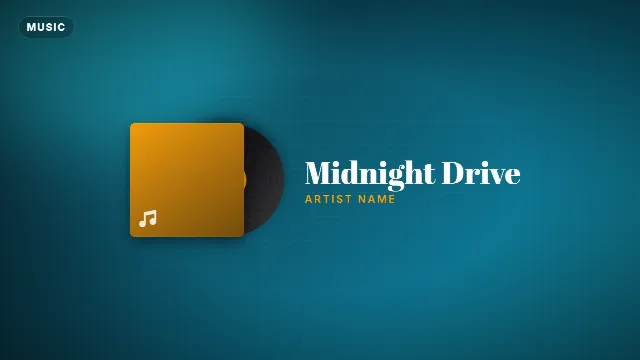
| Song title at the start | Vinyl Record Song Title |
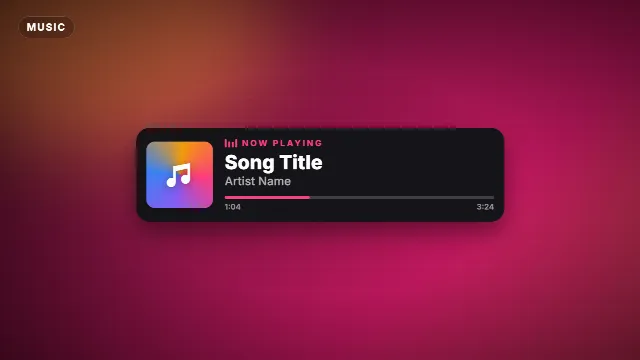
| A song card in a corner, or on a stream | Now Playing Music Card |
| Short lyric snippets for Shorts and TikTok | Pop Captions (Shorts) |
| The hook line or chorus, big and bold | Kinetic Words Title |
- Vinyl Record Song Title: a spinning record slides out of its sleeve next to your song title and artist.
- Now Playing Music Card: a label, song and artist with spinning cover art, an equalizer and a running progress bar.
- Pop Captions: up to 90 characters, shown three words at a time with each word highlighted in turn. It has a pop sound on every group, which you can mute if it clashes with the song. Like the karaoke lines, the timing is even, so stretch or split it in your editor.
- Kinetic Words Title: up to six words slam in from alternating sides. Good for the one line everyone sings along to.
Visualizers to put behind your lyrics


What to put behind the lyrics
Lyrics on a black screen get boring fast. A few backgrounds that work:
- An audio visualizer that moves with the music. Make one with Avee Player on Android: read how to make a music visualizer with Avee Player and browse Avee Player templates.
- A phonk or NCS style look for electronic tracks. See the phonk and NCS visualizer guide.
- The cover art, slowly zooming in, darkened so the text stays readable.
- Performance footage of the artist, with the lyrics in the lower part of the frame.
Design tips
- Strong contrast between sung and unsung. A bright accent for the fill, a soft gray or white for the rest. If the two colors are close, nobody sees the fill move.
- A bold sans serif font reads best when text is moving. Save script fonts for the title card.
- Same style for the whole song. Change only the words between clips.
- Darken busy backgrounds with a dark layer or a blur, so the lyrics stay on top.
- Vertical for Shorts: render in 9:16 and keep the lyrics in the middle of the screen, away from the buttons and captions at the bottom.
- No green in your colors if you use the green screen file.
Music rights
The templates are free to use in personal and commercial videos. The song is another story: posting someone else's music can get your video blocked or its income claimed. Use your own music, licensed music or tracks that allow it. More in free template credit and copyright.
Checklist
- Lyrics split into short lines, in pairs
- One clip per pair, same colors and font
- Each clip split in the pause and stretched to the singing
- A title card at the start
- A moving, darkened background
Frequently asked questions
Edit online
Make karaoke lyric lines online
Free with a free account, in 16:9, 9:16 or 1:1.
Type two lyric lines, pick colors and a font, download a transparent video.
Open Karaoke Lyric Lines