
Edit online
Make it in your browser, free
Type your text, download the video. No app needed.
On this page · 7 sections
A Valentine's Day video can be a slideshow of your photos for your partner, a romantic Short for your followers, or a quick promo for a Valentine's offer in your shop. What makes it feel like Valentine's is mostly the text and the colors: a soft title, pink and red, a script font and a few hearts. You don't need After Effects for that. This guide shows the love templates in the library, how to turn general templates into Valentine versions in the browser, four video ideas, and how to put it all together in CapCut, Premiere Pro or DaVinci Resolve.
Valentine's templates in the library
Creators share a lot of romantic templates on Velosofy: love intros, heart slideshows, wedding style titles and visualizers for love songs. They are all on one page with the Valentine's and love templates. Each template page says which app it is made for, such as After Effects or Avee Player, so pick one that matches the software you use. From late January the homepage shows them as well.
Love and Valentine's templates on Velosofy


Make a Valentine version in the browser
The templates on Edit online are not made for Valentine's Day, but they take your own text, colors and font. Type a Valentine line, pick pink or red, choose a script or serif font, and they look made for February 14. These five fit best.
Elegant Serif Title
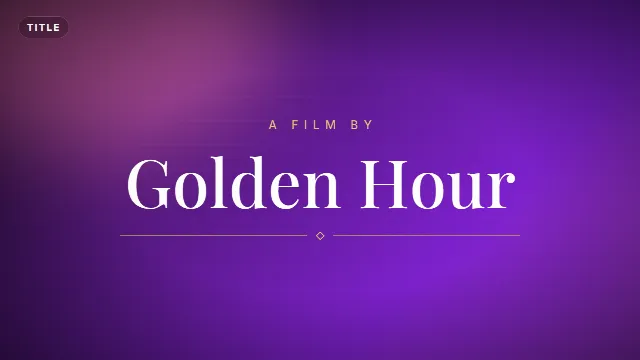
The Elegant Serif Title softens serif letters into focus while fine lines and a small diamond draw out underneath. The title takes up to 22 characters, so "Happy Valentine's Day" (21) fits, and the small line above it up to 24, for example "For you, Emma". It starts in Playfair Display with a gold accent: change the accent to pink or red and it becomes a Valentine's title card. 6 seconds.
Free template
Elegant Serif Title
Quote Card
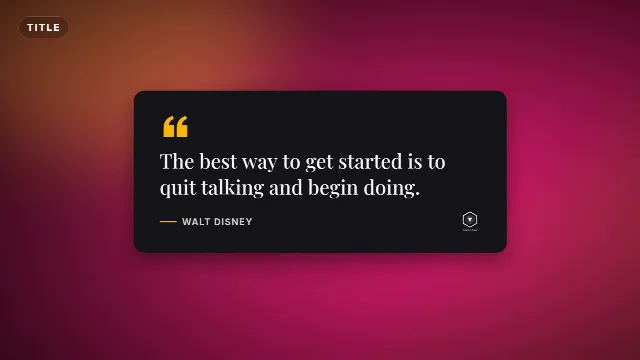
The Quote Card is a card where your words fade in one by one, signed with a name. The quote takes up to 140 characters and the author 30, enough for a short love note or a line from a poem that is free to use. You set the accent, the text color and the card's background color, and a small logo can sign it off on the right, handy for a shop. 7 seconds.
Free template
Quote Card
Kinetic Words Title
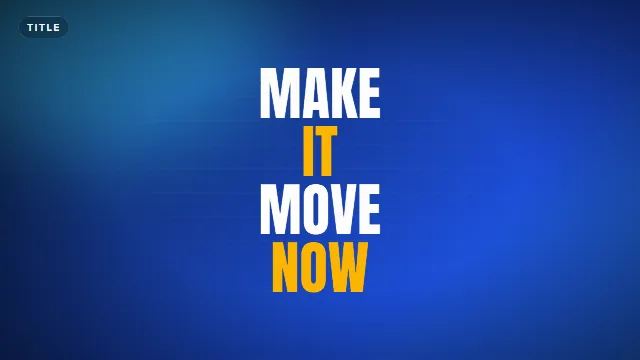
The Kinetic Words Title slams in each word from alternating sides and stacks them into a bold title. It takes up to 40 characters and shows up to six words, in capitals, alternating between your text color and your accent color. White and pink with "3 DAYS TO VALENTINE'S" or "BE MY VALENTINE" makes a strong hook. 5 seconds.
Free template
Kinetic Words Title
Minimal Clean Lower Third
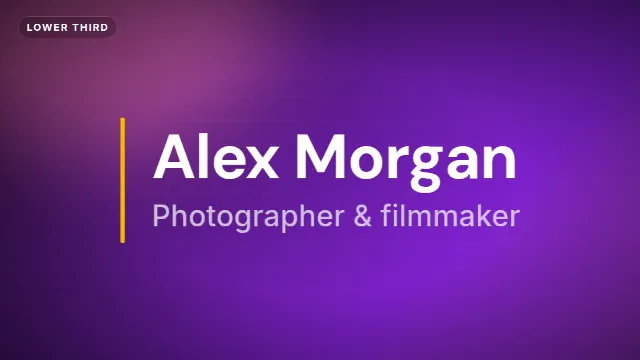
The Minimal Clean Lower Third lifts a name (up to 28 characters) and a line under it (up to 40) out of a mask next to a thin accent line. Use it for "Emma & Lucas" with "Five years together", or for your shop name with "Valentine's bouquets, order by Feb 12". It sits left, center or right. 6 seconds. More about placing it in how to make a lower third.
Free template
Minimal Clean Lower Third
Instagram Follow Card
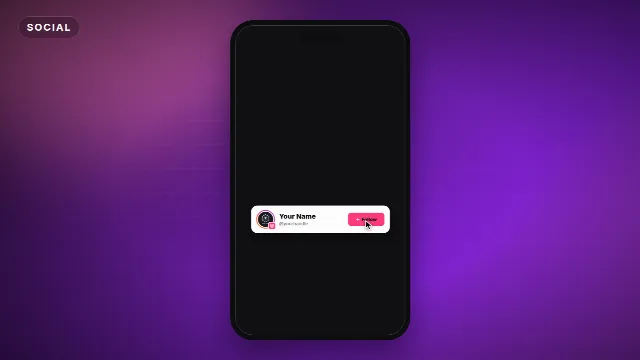
The Instagram Follow Card is a white profile card with a story ring, your name, your handle and a Follow button that gets tapped, with little hearts bursting out. Its default accent is already pink, so it fits a Valentine's Reel as it is. You can upload your logo as the avatar. 5.5 seconds. See also how to add a follow card.
Free template
Instagram Follow Card
Valentine colors and fonts
| Look | Accent | Text | Font |
|---|---|---|---|
| Soft and romantic | Pink #ff3d7f | White #ffffff | Dancing Script or Satisfy |
| Classic and elegant | Red #e11d48 | White #ffffff | Playfair Display or Cormorant Garamond |
| Playful | Pink #ff3d7f | White #ffffff | Pacifico or Lobster |
| Bold Shorts hook | Red #e11d48 | White #ffffff | Abril Fatface or Anton |
For the Quote Card, a dark wine background such as #3b0a1a looks warm, or try a soft pink card (#ffe4ec) with dark text. Script fonts read best in mixed case, so use them for the Elegant Serif Title and the Quote Card, and a bold font for the Kinetic Words Title, which writes in capitals.
Four Valentine's video ideas
A video for your partner
Put your favorite photos in a row, three to four seconds each, open with the Elegant Serif Title ("Happy Valentine's Day" with "For you, Emma"), and end with a Quote Card holding a short line of your own. Add a song you are allowed to use, or record a voice message over the photos. That is often the part people remember most.
Valentine Shorts and Reels for creators
Start with a hook in the first second: the Kinetic Words Title in 9:16 with "BE MY VALENTINE" or "DATE IDEAS UNDER 10 MINUTES". Close with the follow card in pink. Keep text away from the bottom of the frame, where the app buttons sit, see text overlays for TikTok, Reels and Shorts.
A Valentine's offer for a small business
Film your product or shop window, add the lower third with your shop name and the offer, and finish on a Quote Card with your logo, for example "Something sweet for someone sweet" signed with your shop name. Render it in 9:16 for Stories and 1:1 for your feed. Post it in the first days of February, when people start looking for gifts.
A countdown to Valentine's Day
Post a short clip each day with the Kinetic Words Title: "3 DAYS TO VALENTINE'S", then "2 DAYS", then "TOMORROW". Shops can show a gift idea in each one. For a live countdown in seconds, the timers in how to add a countdown timer work too.
Make it step by step
- Open a template above and go to the editor on its page.
- Type your Valentine's text. The live preview updates as you type.
- Set the accent and text colors to pink, red or white, and pick a script or serif font.
- Change the animation speed if you want it slower and softer.
- Choose the size: 16:9, 9:16 or 1:1.
- Create the video. It renders on our server in about a minute, then you download it.
The download is a zip with a transparent -alpha.mov (ProRes 4444), a -greenscreen.mp4
and the sound effects as a separate WAV. Videos are free to make and download with a free account.
Put it in your video
In CapCut, add the -greenscreen.mp4 with Overlay → Add overlay,
then remove the green with Cutout → Chroma key, see
green screen overlays in CapCut.
In Premiere Pro, put the -alpha.mov on V2 above your photos or footage. In
DaVinci Resolve, drop it on Video 2. If it shows black instead of your video, set the alpha mode
to Straight in Clip Attributes. For a full screen title card, put a dark red or black background under it, or a
blurred photo of the two of you.
Tips for a Valentine's video
Keep the text short
One line per title is enough. Let the photos and the music carry the feeling, and save the longer words for one Quote Card at the end.
Use music you have the rights to
Love songs are tempting, but a song you bought is not licensed for a video you post. Use the music library in the app you post to, or a royalty free track. See credit and copyright for free templates.
No green in the graphics
Pink, red and white key out cleanly. A green accent would disappear with the green screen background.
Make it early
People search for Valentine's ideas from late January. Make your titles in advance and you only need to drop in the photos on the day.
Checklist
- Your photos or clips, three to four seconds per photo
- A title: "Happy Valentine's Day", "Be my Valentine" or your own words
- Pink or red with white, a script or serif font, no green
- Music you are allowed to use
- 9:16 for Reels and Shorts, 16:9 for YouTube, 1:1 for your feed
Browse all text titles, intros, or see how to make a Christmas intro for the other holiday of the year.
Frequently asked questions
Edit online
Make your Valentine's title
Free with a free account, in 16:9, 9:16 or 1:1.
Type "Happy Valentine's Day", pick pink and a serif font, and download a title for your video.
Edit online for free