
Edit online
Make it in your browser, free
Type your text, download the video. No app needed.
On this page · 8 sections
A phonk visualizer is the dark, bass-heavy music video you see behind drift phonk tracks: a glowing spectrum that punches on every kick, a cover image in the middle and the song title in bold capitals. The quickest way to make one is in the browser. Upload your cover, pick the tempo of your track and download the video, no Avee Player or After Effects needed. This guide shows how, how to use the result in a phonk edit, and how the NCS and Trap Nation styles differ, with free community templates for each.
Make a phonk visualizer in your browser
Phonk Audio Visualizer
The Phonk Audio Visualizer is a circular spectrum around your cover image. The bars are mirrored left and right like a classic visualizer, with the bass at the top and the treble at the bottom. On every kick the whole screen shakes, a flash lights up the center, the ring and the cover pulse, and the song title gets a red and blue split. A cowbell riff lights up the bars in between, and particles drift outward from the ring.
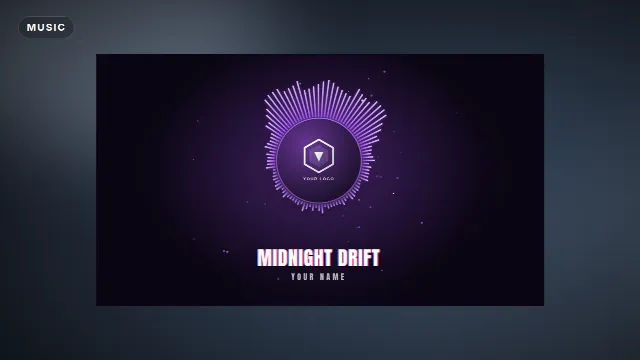
Free template
Phonk Audio Visualizer
The template does not listen to audio. It moves to a phonk beat pattern that is built in: a syncopated kick, claps on 2 and 4, offbeat hats and a cowbell melody, at the tempo you choose. The video is silent, so you add your own track in your editor. It is 15 seconds long and loops seamlessly, so you can repeat it for the full length of a song without a visible jump.
What you can change
- Cover image: upload your artwork, logo or a frame from your edit. It fills the disc in the center.
- Song and artist: up to 32 characters each. The song title is shown in capitals.
- Tempo: 112, 128, 144 or 160 BPM.
- Background: Dark (a soft glow in your accent color fading to the background color) or None for a transparent overlay.
- Colors: accent (purple by default), text and background color.
- Font: Anton by default, or any other font from the list.
- Size: 16:9 landscape, 9:16 vertical or 1:1 square.
Step by step
- Open the template page or browse Edit online.
- Upload your cover image and type the song and artist.
- Pick the BPM closest to your track (see below).
- Set the accent color. Deep red such as
#dc2626on a near-black background is the classic phonk look. - Choose Dark for a ready-made video or None to put it over your own footage, and pick the size.
- Create the video. It renders on our server in about a minute, and you download a zip with a transparent
-alpha.movand a-greenscreen.mp4.
Videos are free to make and download with a free account. If you plan to key out the green screen file, avoid a green accent color, or the bars disappear with the background.
Match the tempo to your song
The pulses only feel right when they land on the beat of your track. Look up the BPM of the song (most DAWs and free BPM tap tools show it) and pick the matching option:
- The same BPM: a track at 128 BPM gets 128.
- Half-time tracks: a lot of phonk is felt at half speed. A track at 80 BPM fits 160, 72 fits 144, 64 fits 128 and 56 fits 112.
- In between: pick the nearest option and nudge the clip speed in your editor. For a 130 BPM track, use 128 and set the speed to about 101.5%.
Line up the first kick of the visualizer (it hits at the very start of the clip) with the first kick or the drop of your song, then repeat the clip. Every BPM option fits a whole number of bars in the 15 seconds, so the beat stays in sync across the loop.
Use it in a phonk edit
Phonk is the soundtrack of short edits: drift cars, anime fights, gym transformations. The visualizer works there as a layer, not only as a full music video.
Car and anime edits
Render with the background set to None and put the -alpha.mov on a track above your clips, or key out
the -greenscreen.mp4 in CapCut. Use a still from the edit as the cover so the disc matches the footage.
Show the ring on the intro or the drop and cut it away during the fastest clips, so it does not cover the action. A
Glitch Title for the car or character name and a
Glitch Slices Transition on the drop fit
the same style.
Gym and motivation edits
Here the visualizer works best as the opening seconds before the transformation, or as a corner element with a Now Playing Music Card that credits the track. Pick a bold red or white accent and keep the text short.
Shorts, TikTok and Reels
Render the 9:16 vertical size: the ring is larger and sits a little above the center, which keeps the song title clear of the captions and buttons at the bottom of the screen. Because the clip loops seamlessly, a Short that replays does not show a jump. More on vertical layouts in text overlays for TikTok, Reels and Shorts.
What makes a phonk visualizer
Whether you use the browser template or a downloadable one, the phonk look comes down to a few things:
- Color: black and deep red, sometimes purple, with white or red accents.
- Movement: a spectrum that punches hard on every kick, plus screen shake or flashes on the drop.
- Artwork: night street scenes, cars, anime characters or skull imagery, often grainy or desaturated.
- Typography: bold, condensed fonts in capitals.
- Effects: VHS noise, chromatic aberration and light glitches. Use them on the beat, not constantly.
The community has made many more in this style for Avee Player and other apps. See all phonk visualizer templates.
Phonk visualizers made by the community



NCS and Trap Nation style visualizers
NCS style
The NCS look is cleaner and brighter. It is built to work for every electronic genre and keeps the attention on the logo and the music: a circular spectrum around a round logo, one strong color per video (cyan, magenta, orange), a blurred photo or gradient background with soft particles, smooth bars and the artist and title in a clean sans-serif font. Browse NCS style templates.
NCS style visualizers


Trap Nation style
Trap Nation style visualizers put a round logo in the center with a layered, mostly white circular spectrum, over a photo background that zooms and shakes on the bass, with dust particles floating by. It sits between the two: heavier than NCS, cleaner than phonk. Find them under trap visualizer templates.
Trap visualizers


Side by side
| Phonk | NCS style | Trap Nation style | |
|---|---|---|---|
| Mood | Dark, aggressive | Bright, energetic | Heavy, polished |
| Colors | Black, red, purple | One vivid color per video | White bars over a photo |
| Spectrum | Hard hitting on the kick | Smooth circle | Layered circle |
| Background | Night scenes, cars, anime | Blurred photo or gradient | Photo that zooms on the bass |
| Effects | Shake, glitch, VHS grain | Particles, soft glow | Shake, particles |
Make one in Avee Player or After Effects
Downloadable templates react to the actual audio, which is the advantage over a fixed beat pattern. The steps are the same for every style:
- Pick a template from the listings above.
- Import it. For Avee Player, follow how to import .viz templates.
- Swap the artwork: your logo or cover in the center, a matching background behind it.
- Tune the spectrum: strong bass reactions for phonk and trap, smooth for NCS.
- Export at 1080p. The full process is in the Avee Player visualizer guide.
Tips and music rights
Keep one look per channel
Reuse the same template and colors with a different cover per song and your uploads become recognizable in the feed. Make the thumbnail from a frame of the visualizer with the cover large, at 1280×720, see YouTube banner and thumbnail sizes.
Use music you are allowed to use
A visualizer is still a music upload, and many phonk tracks are not free to use. Use your own beats, royalty-free music, or NCS tracks within the rules NCS publishes, and credit the artist in the description. Our guide to credit and copyright explains the basics.
More styles to explore
Browse bass boosted visualizers, EDM visualizers or the full collection of audio visualizer templates. For a song title without a spectrum, try the Vinyl Record Song Title.
Frequently asked questions
Edit online
Make your phonk visualizer online
Free with a free account, in 16:9, 9:16 or 1:1.
Upload your cover, pick the BPM of your track and download a circular spectrum that pulses on the beat.
Make a phonk visualizer