
Edit online
Make it in your browser, free
Type your text, download the video. No app needed.
On this page · 6 sections
A trivia quiz video asks viewers a question, gives them a few seconds to answer, then reveals the right answer. On YouTube the popular format is a full quiz game: 10 to 20 questions in one video, often in a series with a theme per episode. On Velosofy each quiz template is one animated question with a countdown and an answer reveal. You make one video per question in the browser and put them together in your editor. This guide covers the four quiz formats, how to plan a quiz, and how to make 20 questions without setting up each one from scratch. For quizzes in vertical Shorts, see how to make a quiz video for Shorts, TikTok and Reels.
The four quiz formats
Four Answer Quiz Game
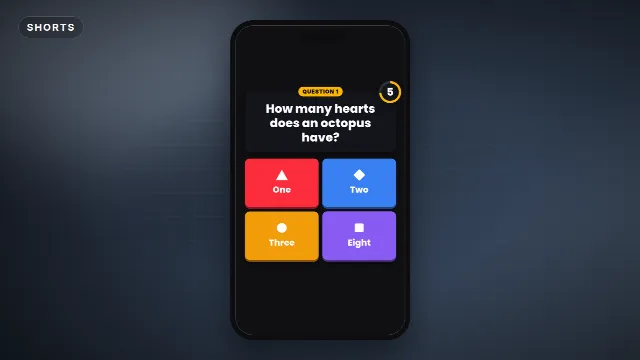
The Four Answer Quiz Game looks like a TV game show: a question, four colored answer tiles and a 6 second countdown, then the wrong answers drop away and the right one celebrates. You type the question (up to 80 characters), four answers (up to 22 each), the label such as "Question 1" and the reveal text such as "Correct!". It runs for 10 seconds.
Free template
Four Answer Quiz Game
Quiz Question With Timer
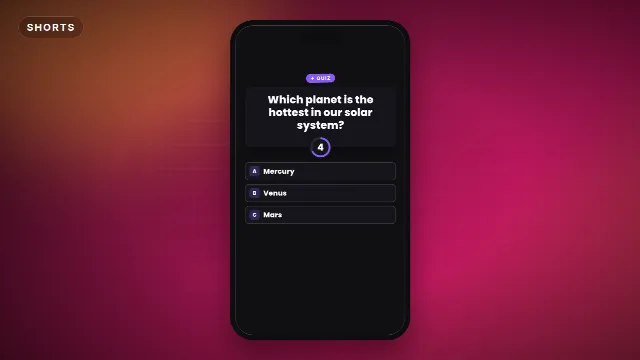
The Quiz Question With Timer is a calmer trivia card with three answers and a 5 second countdown ring. The right answer lights up and the others fade. 8 seconds in total.
Free template
Quiz Question With Timer
True Or False Quiz
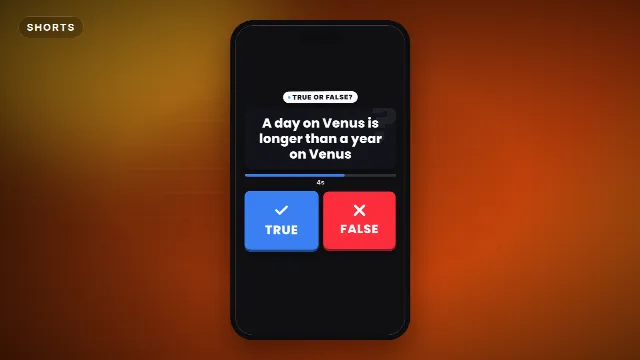
The True Or False Quiz shows a statement (up to 80 characters), two big buttons and a draining timer bar. After 5 seconds the right answer gets stamped and confetti flies. You can rename the buttons, for example to "Fact" and "Fake". It runs for 9 seconds.
Free template
True Or False Quiz
Guess The Word Quiz
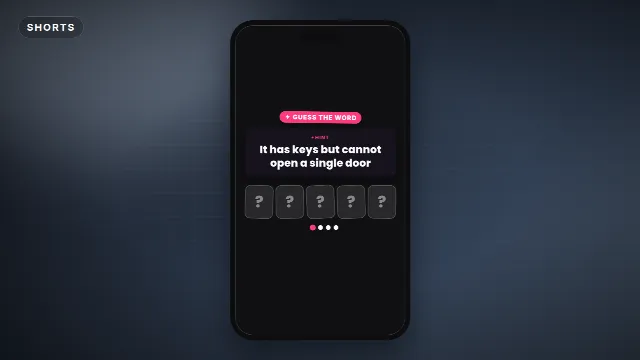
The Guess The Word Quiz gives a hint (up to 70 characters) and hidden letter tiles. Halfway through you can show the first letter, then every tile flips to spell the answer (up to 14 letters). It runs for 10 seconds.
Free template
Guess The Word Quiz
Which format for which quiz
| Quiz | Try |
|---|---|
| General knowledge, game show style | Four Answer Quiz Game |
| School, lessons, a calmer look | Quiz Question With Timer |
| Fun facts, "fact or fake", myths | True Or False Quiz |
| Riddles, emoji or word puzzles | Guess The Word Quiz |
You can mix formats in one video, for example 15 four answer questions and a true or false round at the end. Keep the same accent color and font, so it still looks like one game.
Plan the quiz first
- Pick a theme. "Geography", "90s movies" or "Guess the country by its flag" is easier to find and to share than "random questions".
- Write all questions in a list, with the answers and the right one marked. A spreadsheet works well.
- Order them from easy to hard. Easy questions at the start keep viewers watching, hard ones at the end make them comment.
- Check the length. Questions up to 80 characters, answers up to 22 in the four answer game. Shorter reads faster.
- Mix the right answers between A, B, C and D, so viewers can't guess a pattern.
Make 20 questions without starting over
- Open the Four Answer Quiz Game and go to the editor on its page.
- Set the look once: accent color, text color, background color, font and animation speed.
- Choose 16:9 landscape for a YouTube video.
- Type question 1, the four answers and the right one, set the label to "Question 1", and create the video.
- For the next question, open your video in My videos to make it again. The colors, font and size are kept, so you only change the text and the label.
- Repeat until your list is done. Each video renders on our server in about a minute.
Tip: use Save as my brand kit in the editor. Your colors and font are then filled in automatically in every quiz format, so a true or false round matches the rest.
Each download is a zip with a transparent -alpha.mov (ProRes 4444), a -greenscreen.mp4
and the sound effects, also as a separate WAV. Videos are free to make and download with a free account. Making a
whole series without it? Credits remove the label, one credit per video, and the 50 video pack covers a few full quiz
videos.
Quiz templates on Velosofy
Put the quiz together
- Import all question videos and put them on the timeline in order.
- Put a background under them: a color, a looping video or your own footage. The
-alpha.movis transparent, so the background shows through. - Add a short intro, see free intro templates, and an end screen with your score question: "How many did you get right?"
- Add background music under the whole video, quieter than the quiz sounds.
In Premiere Pro, DaVinci Resolve and Final Cut Pro, use the
-alpha.mov. In CapCut, add the -greenscreen.mp4 as an overlay and remove
the green with a chroma key, see green screen overlays in CapCut.
Tips that keep people playing
Tell viewers to keep score
Say it at the start: "Count your points, tell us your score in the comments." It gives viewers a reason to watch to the end and to comment.
Number every question
Use the label for "Question 7 of 20". Viewers like to know how far they are, and it helps them come back to a question in the comments.
Make a series
A quiz channel grows with a recognisable format: the same look, the same number of questions, a new theme each episode. Put the theme and number in the title, for example "Geography Quiz #4: 20 Capital Cities".
Cut the best questions into Shorts
Render a few questions in 9:16 too and post them as Shorts with "Full quiz on the channel". See quiz videos for Shorts.
Checklist
- A theme and a list of 10 to 20 questions, easy to hard
- Questions up to 80 characters, short answers
- The look set once, then "make again" from My videos for each question
- Numbered labels and a score question at the end
- 16:9 for the full quiz, 9:16 for the Shorts that promote it
Browse all Shorts templates, text and titles, or search for quiz templates.
Frequently asked questions
Edit online
Make your first quiz question
Free with a free account, in 16:9, 9:16 or 1:1.
Type the question and answers, pick the right one and download it with a countdown and sound.
Edit online for free