Edit online
Make it in your browser, free
Type your text, download the video. No app needed.
On this page · 6 sections
To make a quiz video for Shorts, TikTok or Reels, show a question with a short countdown, then reveal the answer, and repeat that for a few questions. On Velosofy you can make each question for free in the browser: open a quiz template on Edit online, type your question and answers, pick the correct one, and download a vertical video with the timer, sounds and reveal built in. This guide covers the quiz formats, how to build a full quiz from single questions, and what keeps people watching until the answer.
Why quiz videos work
A quiz gives viewers a reason to stay: they want to know if they were right. That keeps them watching to the reveal, makes them rewatch when they missed it, and gets them to comment their score. It is one of the easiest formats to make every day, because the template stays the same and only the question changes.
The quiz formats
| Format | Template | What you change |
|---|---|---|
| Multiple choice with a timer | Quiz Question With Timer | Question, three answers, the correct one |
| True or false | True Or False Quiz | Statement, the answer, label, both button texts |
| Game show with four answers | Four Answer Quiz Game | Question, four answers, the correct one, label, reveal text |
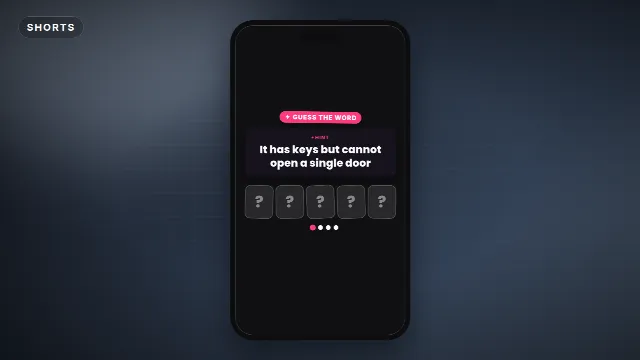
| Riddle or guess the word | Guess The Word Quiz | Hint, answer, label, first letter as a hint or not |
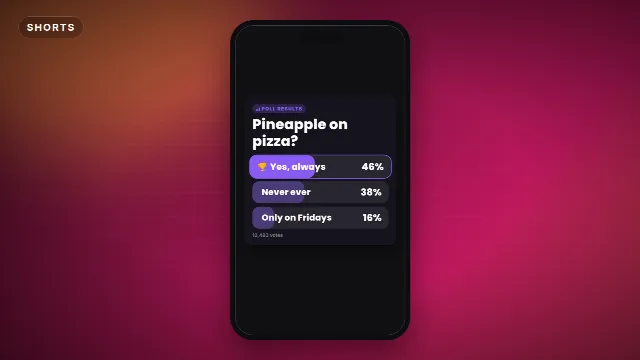
| Poll results | Poll Results Bars | Question, 2 to 4 answers with a percentage each, votes line, label |
| Ranking | Top 5 Ranking Countdown | Title and five entries |
| Ask for answers in the comments | Comment Below Prompt (Shorts) | Accent color, font and speed |
Quiz Question With Timer
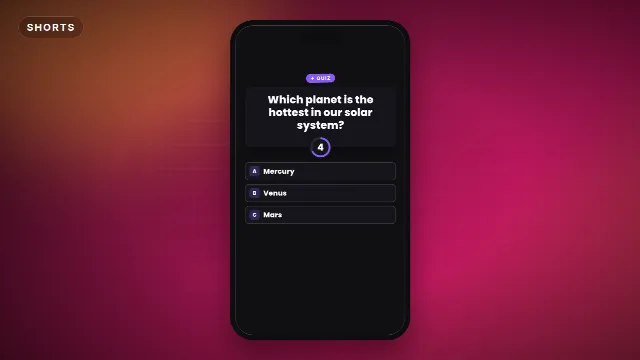
A trivia card with three answers and a 5 second countdown ring that ticks every second. Then the right answer lights up with a ding and the others fade. The video is 8 seconds long. Questions can be up to 80 characters.
True Or False Quiz
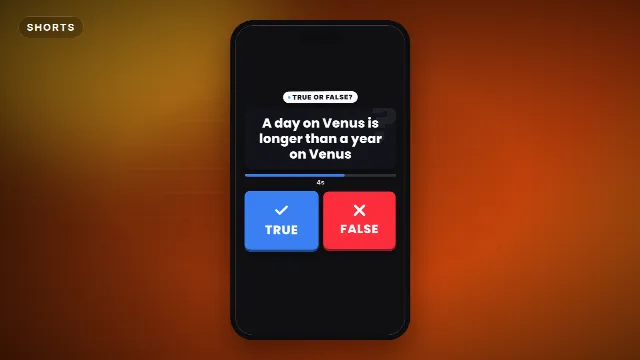
A statement, two big buttons and a draining timer bar. Then the right answer gets stamped and confetti flies. You can rename the buttons, so "Fact" and "Fake" or "Yes" and "No" work too. 9 seconds.
Four Answer Quiz Game
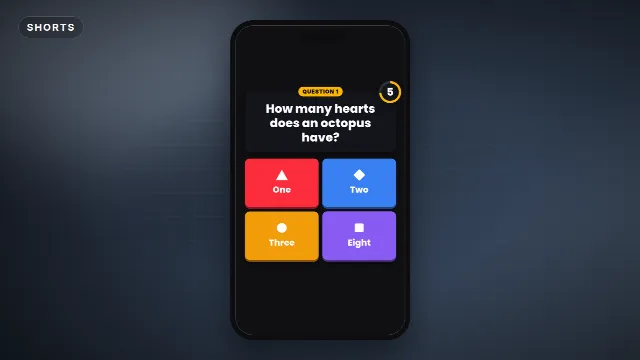
A game show style question with four colored answer tiles and a 6 second countdown. The wrong answers drop away and the right one celebrates with your reveal text, "Correct!" by default. 10 seconds.
Guess The Word Quiz
A riddle with hidden letter tiles and a 5 second countdown. Halfway through, the first letter can appear as a hint, then every tile flips to spell the answer. Answers can be up to 14 letters. 10 seconds.
Poll Results, Top 5 and Comment Below
Poll Results Bars fill up, the percentages count, and the winner gets a trophy. You set each percentage with a slider, so you can show the real results of a poll from your community tab or stories. The Top 5 Ranking Countdown fills a board from number 5 to number 1, with a trophy for number one. The Comment Below Prompt is a card that says COMMENT BELOW and types out "Your answer..." with a bouncing arrow, a good last clip for a quiz.
Free template
Poll Results Bars
Quiz templates on Velosofy
Make one question in the browser
- Open a quiz template on Edit online.
- Type the question and the answers. The live preview updates as you type.
- Pick the correct answer in the editor.
- Change the label to show the question number, where the template has one.
- Pick the accent, text and background colors, a font from the 38 on offer, and the speed.
- Choose 9:16 for Shorts, TikTok and Reels.
- Create the video. It renders on our server in about a minute.
With a free account you download a zip with a transparent -alpha.mov (ProRes 4444), a
-greenscreen.mp4 and the sound effects, also as a separate WAV. Videos are free to make and download with a free account. The ticks, dings and swooshes are already in the video.
Build a full quiz from single questions
- Plan five to ten questions. Start with an easy one so viewers feel smart, and end with the hardest.
- Make one video per question. Open the same template, change the text and the label, create it again. Same colors and font every time.
- Pick a background. A looping background clip, gameplay, a photo that fits the topic, or a plain color. Put it on the bottom track.
- Stack the questions on top. In CapCut, add each
-greenscreen.mp4as an overlay and remove the green with Cutout → Chroma key. In Premiere Pro, DaVinci Resolve or Final Cut Pro, put the-alpha.movfiles on a track above the background. - End with a prompt. Add the Comment Below Prompt or a line like "Comment your score".
More on keying in how to use green screen overlays in CapCut.
Tips that keep people watching
Hook with the question, not a title
The first frame should already be the quiz. "Only 10% get all five right" over the first question works better than a separate title card. See how to hook viewers in the first second.
Keep questions short
Viewers need to read the question and the answers inside the countdown. One line questions and one or two word answers work best. If it takes longer to read than to think, shorten it.
Make wrong answers believable
A quiz is fun when the wrong answers are tempting. Mercury, Venus and Mars for "the hottest planet" works because most people guess Mercury.
Mind the safe zone
The quiz templates are laid out for a phone screen in the 9:16 size. If you add your own text, keep it out of the bottom and the right edge, where captions and buttons sit. See text overlays for TikTok, Reels and Shorts.
Colors
Pick one accent color for the whole series so it is recognizable in the feed. Avoid green: the videos also come as green screen files, and a green answer tile would be keyed out with the background.
Ask for the score
End with a question: "How many did you get?" Comments with scores bring more comments, and they tell you which questions were too easy or too hard for the next video.
Checklist
- Five to ten questions, easy first, hardest last
- Short questions and believable wrong answers
- Same template, colors and font for every question
- The 9:16 size, inside the safe zone
- A comment prompt at the end
Find more in Shorts templates, or search for quiz templates and templates for CapCut.
Frequently asked questions
Edit online
Make your quiz video online
Free with a free account, in 16:9, 9:16 or 1:1.
Type a question and answers, pick the right one, and download a quiz with a countdown.
Edit online for free