
Edit online
Make it in your browser, free
Type your text, download the video. No app needed.
On this page · 8 sections
To add a breaking news ticker to a video, use an animated overlay with your own headline and scrolling text, and place it on a track above your footage. On Velosofy you can make one for free in the browser: open the Breaking News Ticker, type your text, pick colors and a font, and download a transparent video. No After Effects needed. This guide covers the three news templates, how to add them in Premiere Pro, DaVinci Resolve and CapCut, and how to keep a news graphic easy to read.
What a news lower third is made of
TV news graphics follow a pattern viewers know at a glance. Most of them combine a few of these parts:
- A label: a short tag such as "Breaking news", "Live" or "Update", usually in red.
- A headline: one line that says what the story is.
- A ticker: a strip of text that scrolls under the headline with extra details.
- A live bug: a small corner badge with LIVE, a location and a time.
You do not need all of them. A headline with a label already reads as news. Add the ticker or live bug when you want the full broadcast look.
The three news templates
Breaking News Ticker
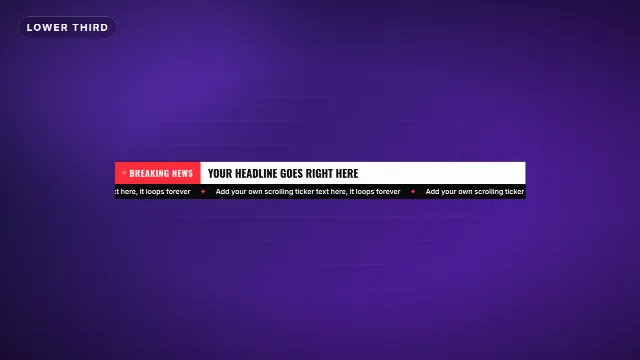
The Breaking News Ticker is a TV news lower third with a blinking label, your headline and a scrolling ticker underneath. You can change the label (up to 18 characters), the headline (up to 48) and the ticker text (up to 90). It wipes open with a news sting sound and wipes away at the end, 6 seconds in total.
Free template
Breaking News Ticker
Live News Headline
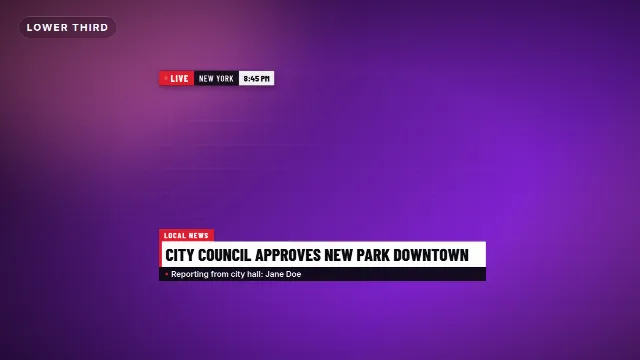
The Live News Headline is a full news package: a blinking LIVE bug with a location and a clock in the corner, and a two line headline bar with a topic tab and a light sweep. You fill in the headline, a topic, a second line (for example the reporter), the live label, the location and the time. It is 8 seconds long.
Free template
Live News Headline
News Intro Opener
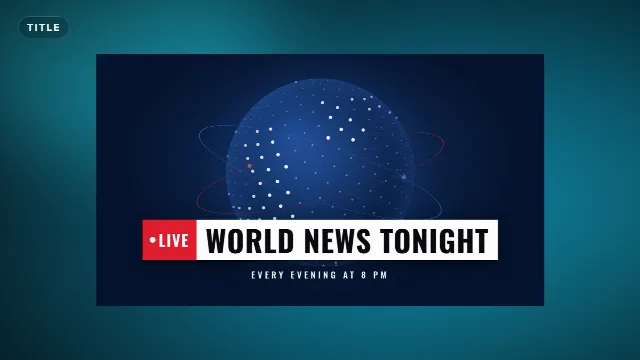
The News Intro Opener starts your show instead of labelling a story. Light streaks race past a spinning dotted globe, then your show name slams in with a Live tab and a tagline. You change the show name, the label and the tagline. It runs for 7 seconds.
Free template
News Intro Opener
Which template for which video
| Video | Try |
|---|---|
| Commentary or reaction with a big headline | Breaking News Ticker |
| Reporting from a place, event coverage | Live News Headline |
| The start of a news show or weekly update | News Intro Opener |
| A parody or skit that needs a TV look | Live News Headline with a made up location and time |
| School projects and class news | News Intro Opener plus the Breaking News Ticker |
| A calmer interview name bar | A regular lower third, see how to make a lower third |
Make it in the browser
- Open one of the templates above and go to the editor on its page, or browse Edit online.
- Type your text. The live preview updates as you type.
- Pick the accent color (the label and bars), the text color and the background color of the plate.
- Choose a font. There are 38, and condensed fonts such as Oswald or Barlow Condensed look the most like TV news.
- Set the animation speed if you want it faster or slower.
- Choose a size: 16:9 landscape, 9:16 vertical or 1:1 square.
- Create the video. It renders on our server in about a minute.
With a free account you download a zip with a transparent -alpha.mov (ProRes 4444), a
-greenscreen.mp4 and the sound effects, also as a separate WAV. Videos are free to make and download with a free account. The templates are free to use in personal and commercial videos.
News templates on Velosofy
Add it in Premiere Pro
- Unzip the download and import the
-alpha.mov. - Drag it onto V2, above your footage, where the story starts.
- The background is transparent, so your video shows through. Keep the out animation at the end so it does not cut off.
Add it in DaVinci Resolve
- Import the
-alpha.movinto the Media Pool. - On the Edit page, drop it on Video 2 above your footage.
- If you see black instead of your video, right click the clip in the Media Pool, open Clip Attributes and set the alpha mode to Straight.
Add it in CapCut
- Add the
-greenscreen.mp4with Overlay → Add overlay and stretch it to fill the frame. - Tap Cutout → Chroma key, pick the green and raise Intensity until it is gone.
- Move it to the moment the headline should appear.
The same green screen file works in Alight Motion and KineMaster, and the .mov works in Final Cut Pro. More detail in how to use transparent video overlays and how to use green screen overlays in CapCut.
Tips for a news graphic that reads well
Keep the headline short
A TV headline is a few words, not a sentence. "Storm closes main bridge" reads in a second. If you need more, move the details to the ticker or to the second line of the Live News Headline.
Use the ticker for extra facts
Viewers watch the headline first and the ticker second. Put the secondary details there: times, places, a website, or the next story. Nobody needs to read the ticker to follow the video.
Red for urgency, one accent only
Red is the classic breaking news color, and blue or navy feels calmer and more like a newsroom. Pick one accent and keep it the same for every story. Avoid green: the overlay also comes as a green screen file, and a green graphic would be keyed out with the background.
Mind the safe area
Keep text away from the edges of the frame, about five to ten percent on each side. In a 9:16 video, the bottom of the screen is covered by captions and buttons on TikTok, Reels and Shorts, so render the vertical size and check that the headline sits above them. See text overlays for TikTok, Reels and Shorts.
Time it with the story
Bring the headline in when the topic starts, not over the last words of the previous one. Six to eight seconds is enough to read a headline twice. For a long segment, show it at the start and again later with an updated headline.
Be clear when it is a parody
A news ticker makes anything look official. For skits and jokes, make it obvious that it is not real news, so the clip is not shared out of context as a real report.
Checklist
- A short headline, extra details in the ticker
- One accent color, no green
- Inside the safe area, above the app buttons in vertical videos
- Transparent .mov for desktop editors, green screen .mp4 for phone apps
- On screen when the story starts, with the out animation intact
Browse all lower thirds, intros, or search for news templates.
Frequently asked questions
-alpha.mov in Premiere Pro, DaVinci Resolve or Final Cut Pro, or remove the green from the -greenscreen.mp4 with a chroma key in CapCut and other phone apps.Edit online
Make your news ticker online
Free with a free account, in 16:9, 9:16 or 1:1.
Type your headline and ticker text, pick colors and download a transparent news overlay.
Edit online for free