
Edit online
Make it in your browser, free
Type your text, download the video. No app needed.
On this page · 7 sections
A now playing overlay is a small music card that tells viewers which song they are hearing: the song title, the artist and a progress bar, in the style of a streaming app. You can make one for free in the browser with the Now Playing Music Card: type the song and artist, pick your colors and download a transparent video to put over a visualizer or your footage. This guide covers what goes on the card, where it works well, the music templates you can make online and how to add the overlay in CapCut, Premiere Pro and DaVinci Resolve.
A quick note on the name: people search for a "Spotify style" card because that is the look they know. The templates here are generic music app style cards with their own design. They carry no app logo and are not official graphics of Spotify or any other service.
What a now playing card shows
Music apps all follow roughly the same layout, which is why viewers read a now playing card at a glance:
- Cover art: a square image on the left, usually with rounded corners.
- Song title: the biggest text on the card.
- Artist: smaller and softer under the title.
- A progress bar with the elapsed and total time.
- Play controls: previous, play or pause and next. In a video they are pure decoration, since nobody can tap them.
For an overlay, the title, artist and progress bar matter most. Some cards add a small label such as "Now playing" or a moving equalizer, so it is clear the song is playing right now.
Where a now playing overlay works
- Music channels that upload one song per video, often over a visualizer or a looping background.
- Slowed + reverb, sped up and lyric uploads, where the card names the original track at the start.
- "Song of the day" Shorts: a vertical clip with the card and a few seconds of the chorus.
- Livestreams, between songs on a music stream or during a break, so viewers know what is on.
- Vlogs and edits: credit the track when the music comes in, instead of only in the description.
Music templates to make online
Now Playing Music Card
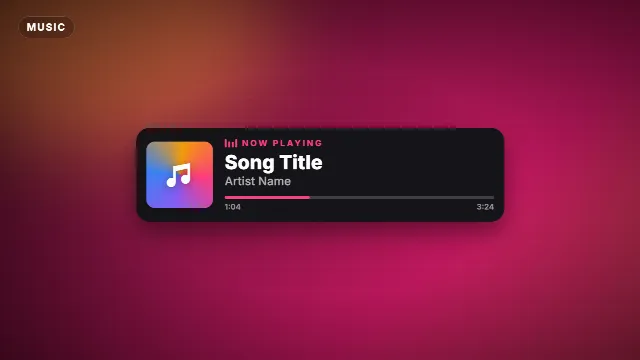
The Now Playing Music Card is the streaming app look: a card with spinning cover art, a small equalizer, a label, your song and artist, and a progress bar with a running time. You can change the label (up to 16 characters, "Now playing" by default), the song (up to 32) and the artist (up to 32). The cover square is an animated color swirl with a music note, not an uploaded image. You pick the accent color (the label, equalizer and progress bar), the text color, the background color of the card, the font and the animation speed. The card slides up, stays on screen and slides away again, 8 seconds at the default speed. In 16:9 it sits in the bottom left corner, in 9:16 and 1:1 it is centered near the bottom.
Free template
Now Playing Music Card
Vinyl Record Song Title
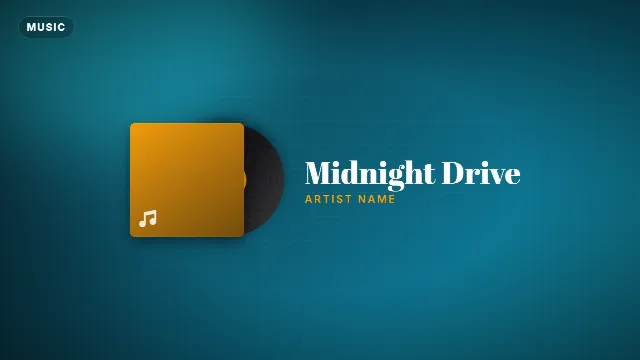
The Vinyl Record Song Title is the retro take: a spinning vinyl record slides out of its sleeve next to the song title and artist. The song takes up to 24 characters and the artist up to 30. It is bigger than the card, so it works best as a title at the start of a music video rather than as a small corner overlay. Also 8 seconds.
Free template
Vinyl Record Song Title
Karaoke Lyric Lines
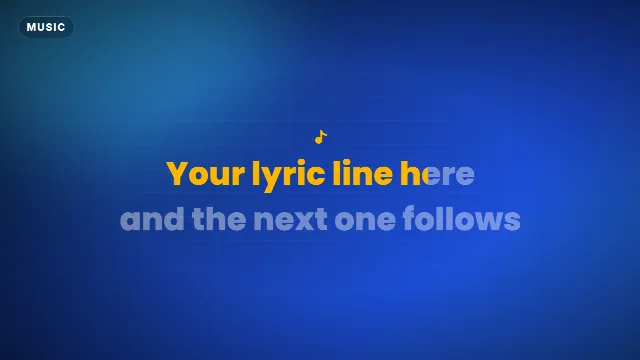
Want the words on screen too? Karaoke Lyric Lines shows two lines of up to 32 characters that fill with color from left to right. Pair it with the now playing card for a lyric upload. How to sync it to the song is explained in how to make a karaoke lyric video.
Free template
Karaoke Lyric Lines
Phonk Audio Visualizer
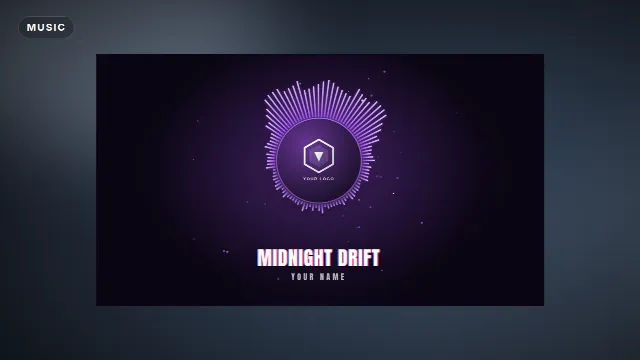
The Phonk Audio Visualizer is the one to use if you want your own cover on screen: you upload a cover image, and a circular spectrum around it pulses with a generated phonk beat at 112, 128, 144 or 160 BPM, with your song and artist (up to 32 characters each) below. The background is dark or transparent, and the 15 second video loops seamlessly. Note that it reacts to its own beat, not to your track.
Free template
Phonk Audio Visualizer
Which template for which video
| Video | Try |
|---|---|
| A song credit in the corner of a vlog or stream | Now Playing Music Card |
| Song title at the start of a music upload | Vinyl Record Song Title |
| Lyric, slowed + reverb or sped up upload | Now Playing Music Card plus Karaoke Lyric Lines |
| "Song of the day" Short with the cover | Phonk Audio Visualizer in 9:16 |
Make it in the browser
- Open one of the templates above, or browse Edit online.
- Type the song and artist exactly as the track is credited. The live preview updates as you type.
- Pick an accent color that matches your channel or the cover of the song, and a background color for the card.
- Choose a font and, if you want, change the animation speed.
- Choose a size: 16:9 landscape, 9:16 vertical or 1:1 square.
- Create the video. It renders on our server in about a minute.
You download a zip with a transparent -alpha.mov and a -greenscreen.mp4.
Videos are free to make and download with a free account. The templates are free to use in personal and commercial videos.
Visualizers to put under your card


Add it over a visualizer or footage
Premiere Pro and DaVinci Resolve
- Unzip the download and import the
-alpha.mov. - Put your visualizer or footage on the first video track and the song on the audio track.
- Drop the card on the track above, where the song starts or where the music comes in.
- In DaVinci Resolve, if you see black instead of your video, open Clip Attributes in the Media Pool and set the alpha mode to Straight.
CapCut and other phone apps
- Add the
-greenscreen.mp4with Overlay → Add overlay and stretch it to fill the frame. - Tap Cutout → Chroma key, pick the green and raise Intensity until it is gone.
- Move it to the start of the song. The same file works in Alight Motion and KineMaster.
With an Avee Player visualizer
Avee Player makes the moving spectrum, the card names the song. Export your visualizer from Avee Player first (see how to make a music visualizer with Avee Player and the free Avee Player templates), then put the now playing card on top in your editor. If your visualizer already shows a title, use the card only for the first seconds so the two do not compete. For darker electronic tracks, the phonk and NCS visualizer guide and the phonk templates fit well.
Tips for a clean music card
- Show it when the song starts, not halfway through. A second time near the end helps viewers who joined late.
- Keep the progress bar honest enough. It runs as an animation, so do not leave the card on screen for minutes, where the time would clearly be wrong.
- Mind the safe area in vertical videos: captions and buttons cover the bottom of the screen on TikTok, Reels and Shorts. See text overlays for TikTok, Reels and Shorts.
- No green in your colors if you use the green screen file, or it disappears with the background.
- No app logos. Keep the card generic, so it does not look like an official graphic of a music service.
Music rights
A now playing card credits a song, but it does not give you the right to use it. Posting someone else's music can get your video muted, blocked or its income claimed. Use your own music, licensed tracks or songs that allow it, and read free template credit and copyright.
More for music videos: audio visualizers, stream overlays and text titles.
Frequently asked questions
Edit online
Make your now playing card online
Free with a free account, in 16:9, 9:16 or 1:1.
Type the song and artist, pick colors and a font, download a transparent music card.
Open Now Playing Music Card