
Edit online
Make it in your browser, free
Type your text, download the video. No app needed.
On this page · 9 sections
A news intro is the short opener at the start of a news video: your show name, a tagline and a sound that says "the news starts now". It makes a channel feel like a real show, and viewers recognise it from the first second. On Velosofy you can make one free in the browser: open the News Intro Opener, type your show name, pick colors and download the video. This guide covers how a news video is built, how to make the intro, and the graphics that go with it, from the headline bar to the ticker.
Who a news intro is for
- News and commentary channels that cover the same topic every week: tech, gaming, sports, crypto, local news.
- Weekly update videos such as "This week in…", a club or school newsletter, or a company update.
- School projects where a class makes its own news broadcast.
- Skits and parodies that need a TV news look.
How a news video is built
Most news videos follow the same order. Viewers know it from TV, so it feels right on YouTube too:
- A cold open: one or two sentences about the biggest story, before the intro.
- The intro: your show name and tagline, 5 to 10 seconds.
- The stories: each one starts with a headline graphic so viewers know what it is about.
- Extra facts: a ticker at the bottom with dates, places or the next story.
- The outro: a short goodbye and an end screen with your next video.
The intro is the part you reuse every time. Make it once, keep it the same for every episode, and only change the headlines.
The News Intro Opener
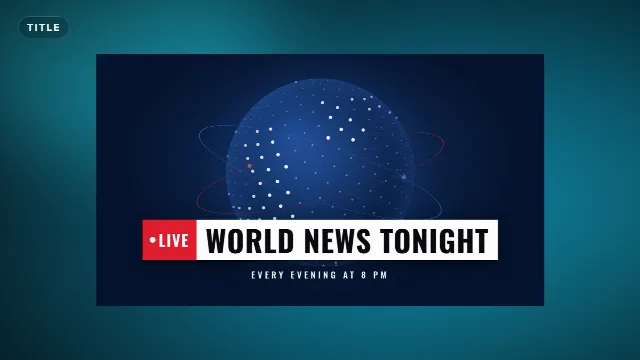
The News Intro Opener is a TV style opener. Light streaks race past a spinning dotted globe with orbit rings, then your show name slams in with a red Live tab and a tagline underneath. It runs for 7 seconds and has its own sound: a riser, whooshes, a news sting when the name lands and a whoosh out.
Free template
News Intro Opener
You fill in three things:
| Field | Example | Max length |
|---|---|---|
| Show name | Tech Week Today | 26 characters |
| Label | Live, Weekly, Episode 12 | 14 characters |
| Tagline | Every Friday at 6 PM | 36 characters |
The tagline is a good place for when the show comes out. It tells new viewers there is a next episode, and that is a reason to subscribe.
Make it in the browser
- Open the News Intro Opener and go to the editor on its page.
- Type your show name, label and tagline. The live preview updates as you type.
- Pick the accent color (the Live tab), the text color and the background color.
- Choose a font. Condensed fonts such as Oswald, the default, look the most like TV news.
- Set the animation speed if you want it faster or slower.
- Choose a size: 16:9 landscape for YouTube, 9:16 vertical for Shorts and TikTok, or 1:1 square.
- Create the video. It renders on our server in about a minute.
With a free account you download a zip with a -alpha.mov (ProRes 4444 with transparency), a
-greenscreen.mp4 and the sound effects, also as a separate WAV. Free videos have a small "Made with
velosofy.com" label, or you can make one without it for one credit. The templates are free to use in personal and
commercial videos.
Headlines and the ticker
After the intro, each story gets a headline graphic. Two templates match the opener:
Live News Headline
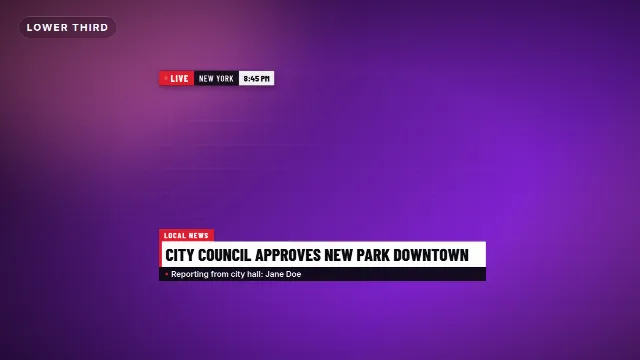
The Live News Headline has a blinking LIVE bug with a location and a clock in the corner, and a two line headline bar with a topic tab. You fill in the headline (up to 52 characters), the topic, a second line such as the reporter's name, the live label, the location and the time. It is 8 seconds long.
Free template
Live News Headline
Breaking News Ticker
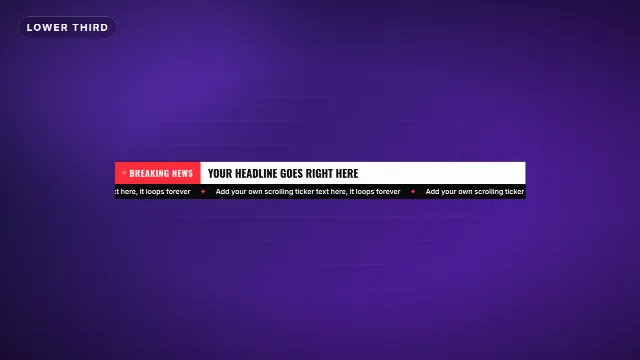
The Breaking News Ticker is a lower third with a blinking label, your headline and a scrolling ticker underneath for extra facts. More about it in how to add a breaking news ticker to a video.
Free template
Breaking News Ticker
Use the same accent color and font in all three, so the intro, the headlines and the ticker look like one show. Tip: once you like a look, use Save as my brand kit in the editor, and your colors and font are filled in automatically in the next template.
News templates on Velosofy
A weekly news video, step by step
- Write your stories first. Three to five stories is enough for a 5 to 10 minute video.
- Record a short cold open about the biggest story.
- Put the news intro right after it. It is the same file every week.
- For each story, make a Live News Headline or a Breaking News Ticker with that story's headline.
- End with an end screen, see the end screen guide.
Your earlier videos stay in My videos. Open one to make it again with the same colors and size, and only change the headline. That way a new episode's graphics take a few minutes.
Add it to your video
In Premiere Pro, DaVinci Resolve or Final Cut Pro, put the
-alpha.mov on a track above your footage. For the intro you can also place it on its own, with the
background color you picked. In CapCut and other phone apps, add the
-greenscreen.mp4 as an overlay and remove the green with a chroma key. Step by step in
how to use transparent video overlays
and green screen overlays in CapCut.
Tips for a news intro that works
Keep it the same every episode
A news intro works because it repeats. Change the headlines, not the intro. If you rename the show, make a new intro once and keep that one.
Don't open with the intro
Start with one sentence about the biggest story, then the intro. Viewers decide in the first seconds whether to stay, and a story keeps them better than a logo.
One accent color, no green
Red feels urgent, navy and blue feel calm. Pick one and use it in all your news graphics. Avoid green: the overlays also come as green screen files, and a green graphic would be keyed out.
Use the vertical size for Shorts
Cutting a story into a Short? Render the intro and headline in 9:16 too, so the text sits inside the frame and above the buttons of the app. See how to open a Short.
Checklist
- A cold open, then a 7 second intro with your show name
- When the show comes out in the tagline
- A headline graphic for every story, in the same color and font
- Transparent .mov for desktop editors, green screen .mp4 for phone apps
- The same intro every episode
Browse all intros, lower thirds, or search for news templates.
Frequently asked questions
Edit online
Make your news intro online
Free with a free account, in 16:9, 9:16 or 1:1.
Type your show name and tagline, pick colors and download a news opener with sound.
Edit online for free